Showing posts with label App. Show all posts

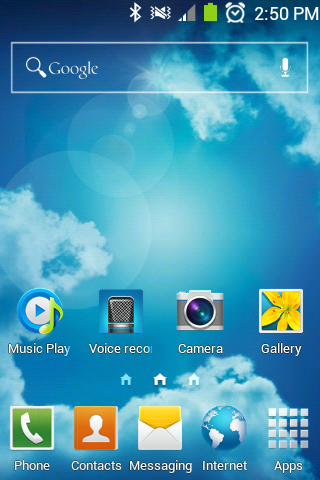
Amazing Samsung Galaxy S4 Launcher v4.0

 Features:

1. SGS4 Animations.
2. Static wallpaper like SGS3 & SGS4 [Wallpaper doesn't move when you scroll the pages]
3. Full SGS4 icons.
4. SGS4 Page indicators.
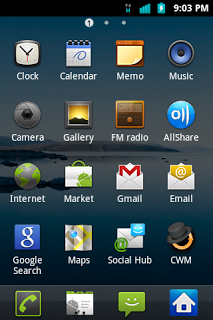
5. SGS4 app drawer.
6. Clearer fonts.
7. Shake to Change Wallpaper
[NOTE: If V4.0 doesn't work, please remove V1.0 and V2.0 and V3.0 First, then flash V4.0]


Flashable zip: Download
Normal apk: Download

Stock Music Player like SIII V2

Stock Player Like SIII
So this is my last work, this is the STOCK GB Player themed like SIII made by SpaceCaker request 
its very similar but didnt have the functions of SIII player (i dont make miracles)
Will work for any STOCK GB
Just install as a normal zip in recovery

You tube 5


Here is the newest YouTube.apk
Download And enjoy

This Black Circle Icon Pack

How to install
go to cwm > mount > flash > enjoy 

DoubleTwist Player Premium (Unlocked) Apk v1.8.6

double-twist Player Premium v1.8.6 (Unlocked)
Requirements: Requires Android phones; MacOS X 10.5 or higher on your Mac, or WinXP SP2/Vista/Windows 7 on your PC
Overview: "The Cure for iTunes withdrawal" -- New York Times
 Are you tired of using multiple apps for things that your iPod could do out of the box? Download double-twist Player and get the best all-in-one music, podcast, radio, video & sync app:

 ♬ Sync music (including iTunes playlists) to your phone from your Mac/PC over USB or AirSync over WiFi.
 ♬ Download legal, high-quality album artwork for your music.
 ♬ Smart Playlists for easy access to your Top Rated and Most Played songs.
 ♬ Subscribe to podcasts without needing a Mac/PC and get new episodes downloaded automatically over 3G or WiFi.
 ♬ Stream music, videos and photos to devices such as Xbox, PS3, Sonos, and Apple TV (black model; AirPort Express not yet supported).
 double-twist Player is a free download and there is a choice of in-app upgrades for premium features such as Air-sync and podcast management. Alternatively, you can upgrade to double-twist Pro and get the three premium features bundled together at a discount.
 double-twist is handmade with ❤ in San Francisco.
 Need help with double-twist? http://doubletwist.com/help/
 If you have comments or feedback on our app, please send to android-support at doubletwist.com first as there's no way to reply to comments in the Android Market. Thanks!
 The free companion doubleTwist desktop app requires MacOS X 10.5 or higher on your Mac, or WinXP SP3 / Vista SP2 / Windows 7 on your PC.
 Use of this app is subject to the doubleTwist Terms of Use and Privacy Policy: http://doubletwist.com/legal/
 What's in this version:
 New in v1.8.6:
 ♬ Fixed an issue that could cause the app to crash on launch when running on Android 4.2 devices.
 New in v1.8.5:
 ♬ Fixed import of Google/Play Music offline tracks to work with the latest version of the Play Music app. This is only supported on rooted devices (and on Android 4.2 you need to use SuperSU instead of Superuser).
https://play.google.com/store/apps/details?id=com.doubleTwist.androidPlayer

Download Instructions: Here

Download all Paid apps and games for free

I give you one amazing app called "black mart" which is one type of android market which allow you to download all apps and games whether paid or free,all are free so download Black mart Here
just install it and enjoy all apps for free

Worry about flashplayer???

We know there is not support adobe flash player for ace yet. So we cant see you-tube videos in desktop mode.
I have solution. Download browser given below. I not test it much but check you-tube videos and it play so our problem solve.

DSP Manager Lite

DSP Manager Lite is a free and powerful sound processing app for android. it comes with a graphic equalizer, bassboost, and a virtualizer. The 2X equalizer is in beta test, it may not work on your device.
The number of bands and frequency ranges vary with devices/roms
features:
 Dual mode Equalizer
 Stereo Virtualizer (Headphone 3D effect using stereo widening)
 Bass booster
Automatic mode selection (HP & LS).
No root required.
O/P Audio visualization

Pro version features:
Dual mode Equalizer
10 Stock Equalizer Presets (if rom supports)
Save, delete, rename preset
 Reverb presets (small room, medium room, large room, medium hall, large hall, plate)
2X Equalizer with three different rendering modes (Slight, Normal, Heavy)
Stereo Virtualizer
Bass booster
Separate profiles for Headphone & Loudspeaker
Automatic mode selection (HS & LS)
No Ads

Stock presets include:
Normal
Classical
Dance
Flat
Folk
Heavy Metal
Hip Hop
Jazz
Pop
Rock

If you have any issues, please feel free to mail us.
Note: Cyanogenmod users please disable your stock DSP Manager bundled with your rom.
Please disable your default DSP Manager, Audio Equalizer, beats audio or any other sound manager for better performance.
Custom ROMs may not work due to issues with the ROM. If your ROM works please post so that others know. If you have issues, please contact us
Please do not post bugs here, Instead, use built-in bug reporter[menu->about->report bug].
Download Here Enjoy your galaxy ace with this great app
You can install it directly or move it into system/app/   using root explorer


Miui launcher

I know there is May of fans of miui rom but yet we not get miui on our ace.
But if you are big fan of miui then here is solution for you
Though this is not rom but launcher
Download
install apk
now push option button(left of middle)
you see theme button. install one theme.
after that i give you other file just copy it to qqlauncher/theme/   and replace older one and now choose theme. you see icons that i posted  in image
some icons and clock is in other language . so remove that clock and install miui clock from market

Awesome music player

it is application called ttpod doesent know it is available in market or not
it supper different themes which make it more beautiful
Take look its screen shots
Just install it as app and in app setting change language to English as it is in some unknown language.
Download


Fpse emulator for playing playstation games

I not use this because i not like to download 300 mb's game for ace but some one request that's why i post it
How to use and all questions are you have to solve using Google.
The long-awaited fully working emulator for the Sony Play Station ANDROID!
Advantages FPSE:
- Very high speed
- Excellent compatibility
- Excellent sound quality
- Conservation in real time
- Emulation audio tracks (using the. cue files)
- Vibrootdacha
- Dynamically loadable skins gamepads
- Guncon emulation (?) Emulation gun (?)
- Analog sticks emulated by sliding across the screen
- Support Gsensor, touchscreen and hardware keyboard.
- Support. img. iso. bin. cue. nrg and. Z disc images.
1) Installation of the emulator
2) Download the BIOS, and throws in memory card. 
3) Load the disk image supported by this emulator (iso, img.bin-cue etc.) 
4) run the image 
5) press the menu button and hard in the settings system in the upper box indicates the path to the BIOS, as in paragraphs audio and expose the video settings to the discretion
 6) play
Download file i gave below it that one is apk and other is bois file wich you have tom locate after install apk
and for finding games for this eluminater go Here Play station games

SPB Shell 3D

Next generation user interface.
3D reality for your phone. Add a new dimension to your Android!
Features:
3D Home screen/launcher
Smart folders
3D widgets
Collection of panels and widgets
SPB Shell 3D Reviews:
"Butter-like smoothness" - Engadget
"As useful as it is gorgeous" - ZDNet
"Absolute Must-Have for every Android user!" - Gizmodo
"Looks Incredible And Runs Smoothly" - LAPTOP Magazine
To launch SPB Shell 3D press the Home button once installation is completed.
If you are not able to launch SPB Shell 3D, please use "Home Switcher" application from Android Market.
Check out our FAQ here: SPB Shell 3D


Make your ace look like Awesome sense


Sense applications for galaxy ace
Many people like HTC sense.
Here I give you apps that make your ace look like sense.
Starting with 
lock application
this lock app enable you to experience sense 3.0 lock. you can add widget as well as four apps that you can directly access through lock. just drag app into ring and that app start.
Just drag ring and your phone open just like sense 3 lock. you gonna love this lock. But you should install this app in phone memory not in sd card otherwise you may suffer problems like force close.
Now about 
launcher 
This launcher is design by launcher pro called lp sense ui. here I put latest version of it.It make your mobile resemble sense ui. You can add widget looks like sense widget.
Link is here sense
Here are some screen shots


Touchwiz launcher

I found this awesome touchwiz launcher from one theme and i pick it from there for normal use without that themeIt is transparent so looks better
See screenshots of my galaxy ace after applying this launcher
Download
How to install
Remenber this launcher is only for roms like fla.sh2 and other
not for stock samsung rom. it will work with stock rom if you done your stock rom deodex
First use root explorer
open root explorer and go system/app/
and locate touckwiz launcher and copy it ans put in sd card cause when you need your original launcher back you can get.
Or backup current touchwiz by titanium backup
now open root explorer and copy touchwiz launcher i give you here and pest it in systen/app/  and also push button on right side upper see image
now long push on replaced touchwiz and then click on permission and change permission to rw-r-r
see in image and in this way tick on permission
now reboot your phone
And you have to rearrange your dock by again put apps in that by drag and drop
and also install one extra launcher like go launcher if this launcher not worked.
If it not worked then replace this launcher by your launcher that you copied in sdcard

 
Galaxy Ace Help © 2012 | Designed by Cheap TVS, in collaboration with Vegan Breakfast, Royalty Free Images and Live Cricket Score